A launcher can search for an app, run a command, or expose a collection of shortcuts. The right choice depends on whether you want a built-in search box, configurable workflows, a cursor-centered menu, or a mix. Disclosure: I develop Fling, which is included here. This is a dated feature and fit comparison, not a speed ranking; details and prices can change.
At a glance
| Tool | Input and focus | Current notes from first-party pages |
|---|---|---|
| Spotlight | Search box opened with Command-Space | Built into macOS; Apple describes searching for apps, files and more. |
| Raycast | Searchable launcher with commands and extensions | Free plan lists Clipboard History, Quicklinks, Calculator, Snippets, Window Management and extensions. Paid plans add AI and other features. |
| Alfred | Searchable launcher; Powerpack adds workflows | Core launcher is free. Powerpack adds features including clipboard history, snippets and workflows; the shop listed £34 for a single-user Alfred 5 license on October 7, 2026. |
| Radial | Cursor-centered radial menu | Vendor lists app, site and folder launch, snippets, context menus, submenus and scripts; macOS 15+, 7-day trial and €19.99 one-time on its page. |
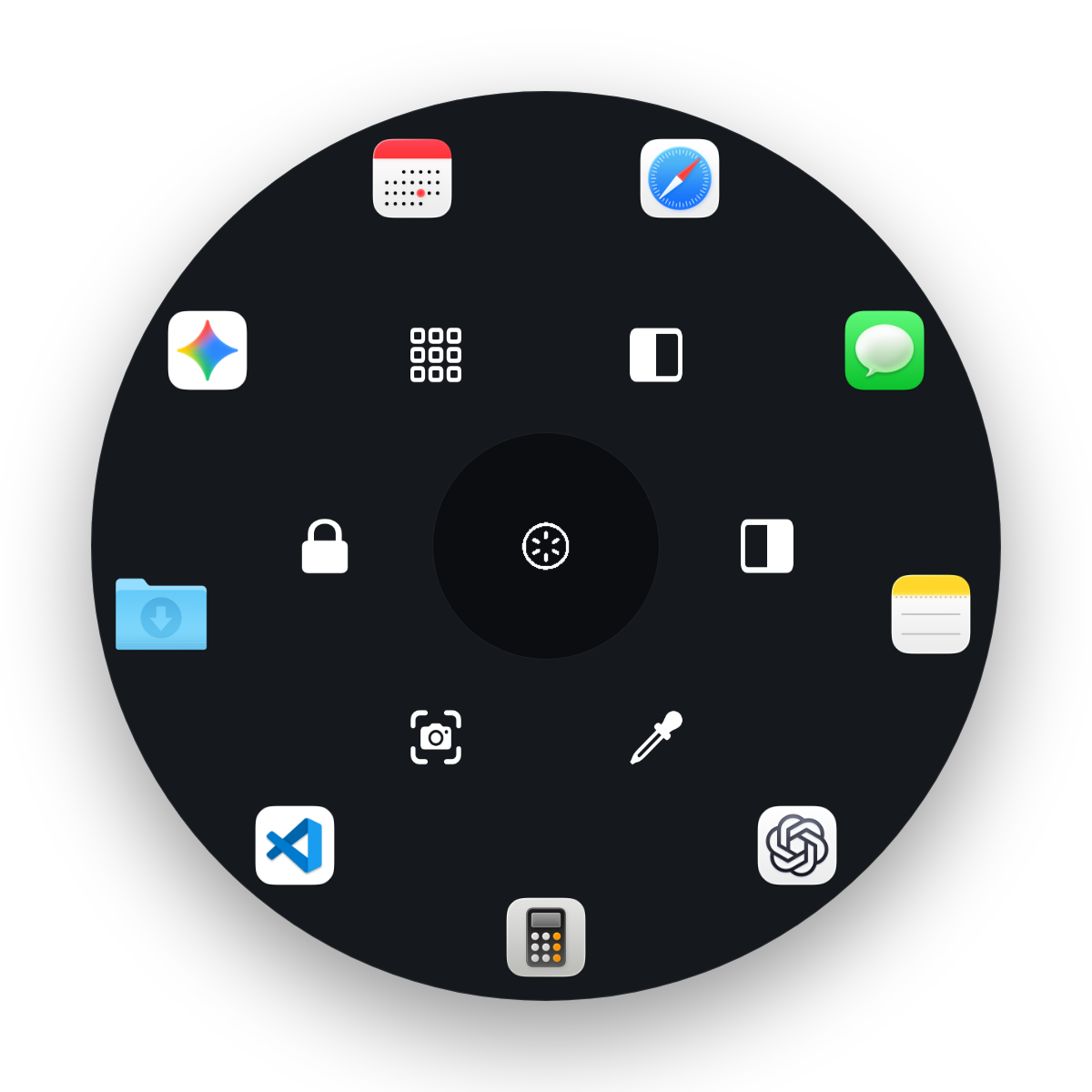
| Fling | Hold a shortcut, flick toward a configured action, release | Up to 15 configured actions, split into six inner and nine outer slots. Owner-developed product; current release and price caveats appear below. |
Spotlight: start with what macOS includes
Spotlight is already available on a Mac and opens with Command-Space. Apple documents it for finding apps, files and other results. It is the simplest starting point if you mainly want to search and launch. Its results and capabilities depend on the macOS version; see Apple’s Spotlight guide.
Raycast: broad built-in tools and extensions
Raycast combines app and command search with built-in tools and an extension ecosystem. Its current Free plan lists Clipboard History, Quicklinks, Calculator, Snippets, Emoji Picker, Window Management, developer tools and public extensions. Paid plans add AI and features such as cloud sync and custom window management. The vendor lists the live tiers on its pricing page and explains the free plan in its billing manual.
Raycast is a strong fit if you want one searchable entry point for commands, extensions and utilities. The free tier already covers many common launcher tasks; do not assume you need a paid plan before checking the feature list.
Alfred: free launcher, paid Powerpack workflows
Alfred’s core app launcher is free. Its paid Powerpack adds capabilities such as clipboard history, snippets and configurable workflows. The Alfred shop listed a £34 single-user Alfred 5 license on October 7, 2026 and said it includes a free Alfred 6 upgrade on release. Prices are shown in GBP and may vary with tax or region; recheck before purchase.
Consider Alfred when you want its launcher plus Powerpack’s workflow system. If you only need app search, try the free core first. Feature and release details are in Alfred’s official feature overview.
Radial: a direct radial-menu alternative
The product named Radial is directly in the radial-menu category. Its vendor advertises app, site and folder launch, snippets, context-aware menus, submenus, scripts, Shortcuts and multi-step actions. The product page currently lists macOS 15+, a 7-day trial and €19.99 one-time; check its current listing before purchase.
For the general difference between a radial menu and a marking menu, see our radial-menu explainer.
Fling: a configured set of pointer actions
Fling places a configurable command wheel at the pointer. Its default trigger is hold Control-Option, move toward a slot and release; the trigger can be changed in settings. It supports up to 15 slots (six inner, nine outer) for apps, files, folders, URLs, system actions and recorded keyboard shortcuts. Built-in actions include left/right window halves, fill/maximize, screenshots and a color sampler with HEX, RGB and HSL copy buttons.
Fling targets Apple Silicon and macOS 14 or later; the developer reports hands-on testing on an M1 MacBook Air running macOS 26.
Fling requires Input Monitoring for the trigger. Accessibility is needed for window actions and keyboard injection; Screen Recording permission is needed for the color picker. Window actions request left half, right half or fill/maximize and may not work with windows that constrain resizing or do not support the relevant menu operation. The editor moves wedges clockwise or counterclockwise; it does not drag-reorder them.
The current early-launch price is $4.99 compared with a $9.99 regular price. It is a one-time license for up to two Macs with a 14-day refund policy; there is no free trial. Context-aware wheels, chains, snippets, directional switching, native Shortcuts/Siri triggers and profiles are planned, not released.
Which one fits your workflow?
- Choose Spotlight if built-in app and file search covers what you need.
- Choose Raycast if you want a searchable launcher with many built-in tools and extensions; review the Free tier before considering Pro.
- Choose Alfred if its free launcher works for you or you want to build around Powerpack workflows.
- Compare Radial if you want a radial menu with vendor-advertised snippets, context menus and automation options.
- Consider Fling if you want to assign a small set of pointer actions to a configurable wheel and accept its permissions.
These tools have different search and input models, so a universal winner would be misleading. For window placement and color sampling, also see our Mac window-tiling guide and HEX-color guide.
Review Fling’s current requirements and pricing
$4.99 early-launch purchase compared with $9.99 regular; one-time license for up to two Macs, 14-day refund policy and no free trial.
View Fling details and pricingFrequently asked questions
Is Raycast Free enough for Mac app launching?
Raycast Free includes app search plus features such as Clipboard History, Quicklinks, Calculator, Snippets, Window Management and public extensions, according to its current pricing page. Paid tiers add features including AI and cloud sync; the exact plan details can change.
What does Alfred cost?
Alfred’s core launcher is free. The Alfred shop listed the Alfred 5 Powerpack single-user license at £34 on October 7, 2026 and said it includes a free Alfred 6 upgrade on release. Check the shop for current pricing, currency and release details.
Can Fling replace Raycast or Alfred?
Fling is not a general search launcher. It runs a configured set of up to 15 actions through a held shortcut and pointer movement; Raycast and Alfred provide searchable launchers and broader extension or workflow systems. Choose by the tasks and input style you need.
Does Fling have a free trial?
No free trial is offered. The current early-launch purchase is $4.99 compared with a $9.99 regular price, with a one-time license for up to two Macs and a 14-day refund policy.