A “best Mac utilities” list is most useful when it helps you match a tool to a task. Disclosure: I built Fling, one of the products listed. This roundup is organized by task, not ranked; linked Apple and vendor pages were checked on October 7, 2026. Features, prices and system requirements can change.
Check macOS before adding another app
macOS already includes useful starting points: Spotlight searches for apps and files, Digital Color Meter samples on-screen color and copies a value as text, and Apple documents built-in window tiling. Options vary by macOS release. Apple’s reviewed Digital Color Meter guide does not promise a copied HEX string; see our guide to copying a HEX color on Mac for the verified workflow and fallback.
Seven utilities by task
| Tool | Useful for | Current model noted on source page |
|---|---|---|
| Shottr | Capturing and annotating screenshots | Free to use; Basic license listed at $12 one-time |
| Maccy | Keeping a searchable clipboard history | Free and open source; macOS 14+ |
| Fling | Launching configured actions from a cursor-centered wheel | $4.99 early-launch purchase; $9.99 regular price |
| Dropover | Holding dragged items in a temporary shelf | Free to download; one-time Pro purchase optional |
| Ice | Hiding and revealing menu-bar items | Free, GPL-3.0; macOS 14+ |
| Rectangle | Moving and resizing windows with shortcuts or snap areas | Free and open source; optional Pro version |
| Velja | Choosing a browser or matching app for links | $8 one-time on the vendor page; current version requires macOS 26+ |
1. Shottr for screenshots
Free use; $12 Basic license listedShottr is a Mac screenshot tool with annotation and scrolling-capture features. Its purchase page says it can be used for free and will prompt users to consider an upgrade after 30 days; the Basic license is listed as a one-time $12 purchase, with commercial-use licensing noted on the page. Check the current Shottr purchase details before buying.
2. Maccy for clipboard history
Free and open sourceMaccy keeps copied items available in a searchable history. Its official site describes it as open source, free, and compatible with macOS 14 or later. Clipboard managers handle sensitive copied text, so review the app’s privacy details and settings before enabling history. See Maccy’s official site.
3. Fling for configured cursor actions
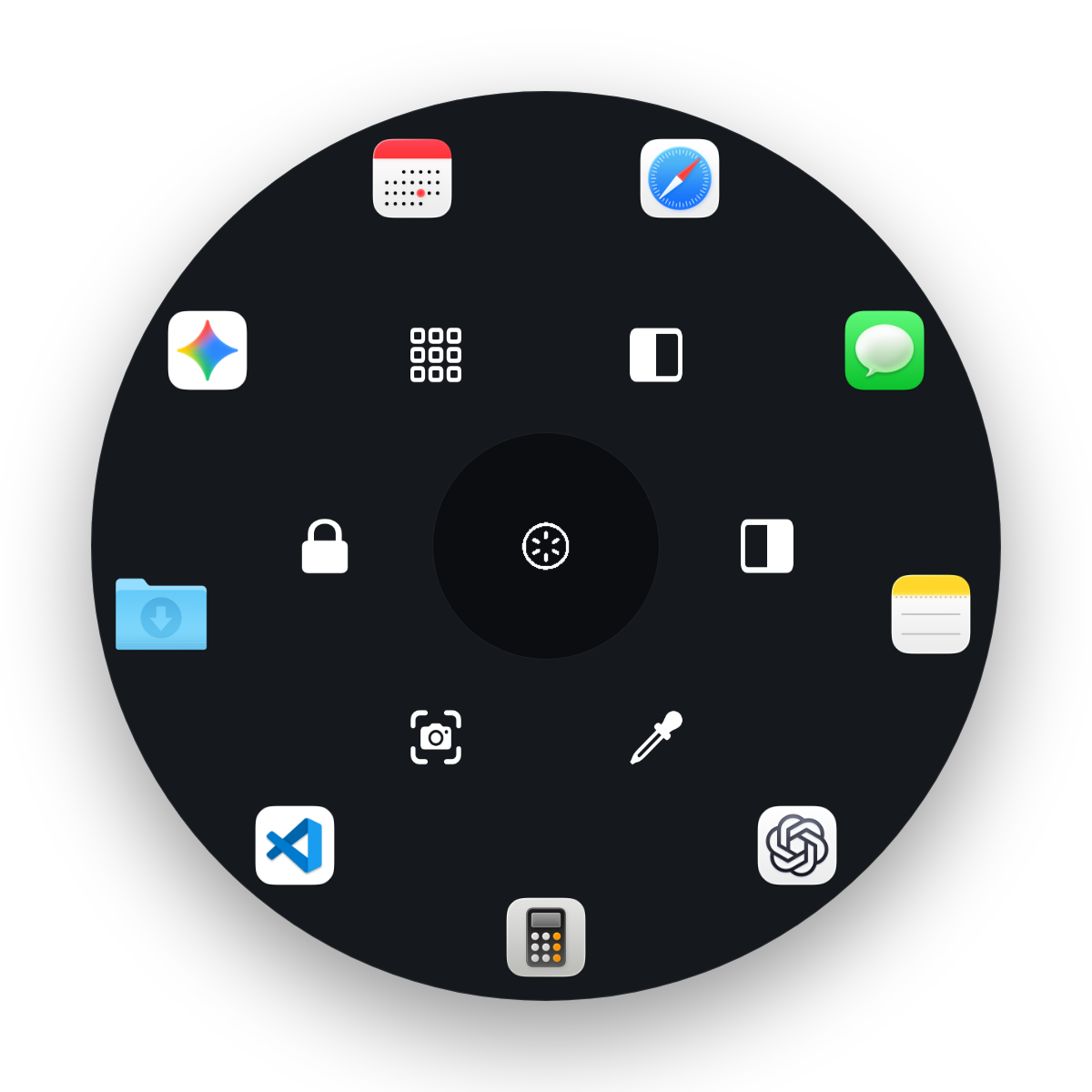
$4.99 early launch / $9.99 regularFling places a configurable wheel at the pointer. The default trigger is hold Control-Option, move toward a configured slot, then release; the shortcut can be changed. The wheel supports up to 15 slots (6 inner and 9 outer), with actions for apps, files, folders, URLs, system commands and recorded keystrokes. Built-in actions include left/right window halves, fill/maximize, screenshots, and a color sampler with HEX, RGB and HSL copy buttons.
Fling targets Apple Silicon and macOS 14 or later; the developer reports hands-on testing on an M1 MacBook Air running macOS 26.
The app needs Input Monitoring to detect its trigger, Accessibility for window actions and keyboard injection, and Screen Recording permission for the color picker. Window actions depend on Accessibility and app support; some windows cannot be resized or tiled. Settings moves wedges with clockwise or counterclockwise buttons; it does not use drag-and-drop reordering.
The one-time license covers up to two Macs and has a 14-day refund policy. There is no free trial. For the current offer and details, see Fling pricing.
4. Dropover for gathering dragged items
Free to download; optional one-time ProDropover opens a temporary shelf where you can collect files, folders, images, links or text, then move them to another destination together. Its FAQ says the app is fully functional for 14 days; after that it remains usable with a three-second wait before interacting with a shelf, unless you purchase Pro. See the Dropover FAQ for the current terms.
5. Ice for menu-bar organization
Free and open sourceIce can hide and reveal menu-bar items and offers additional appearance and organization controls. Its repository lists GPL-3.0 licensing and macOS 14+ support, and notes that development is active, so review the release notes and roadmap for the exact feature you need. Visit the Ice project repository.
6. Rectangle for window placement
Free core; optional ProRectangle moves and resizes Mac windows with keyboard shortcuts or snap areas. The vendor describes the base app as free and open source, with a separate Pro version for additional features. macOS also includes window tiling, so compare the built-in controls with Rectangle’s shortcut and snap-area workflow before adding another utility. See Rectangle’s official site and our guide to snapping Mac windows.
7. Velja for routing links
$8 one-time on vendor pageVelja can prompt for a browser or matching app when opening a link, and supports rules for routing links from particular apps or domains. Its current product page lists an $8 one-time purchase and macOS 26 or later; this requirement is newer than the minimum for some other tools here. Check Velja’s requirements and trial details before installing.
Which one should you try first?
If a built-in feature already covers your need, start there. Otherwise choose the app with the smallest set of features that fits your task, and compare its current price, supported macOS versions, permissions and data handling on the vendor’s own page. Do not add up prices from different dates as if they were one bundle.
For more focused choices, read the launcher comparison and radial-menu guide.
See whether Fling fits your Mac workflow
Fling is an owner-developed command wheel for Apple Silicon Macs targeting macOS 14+. The current early-launch price is $4.99 compared with a $9.99 regular price; a one-time license covers up to two Macs and has a 14-day refund policy. No free trial is offered.
View Fling details and pricingFrequently asked questions
How should I choose among these Mac utilities?
Start with the task you want to make easier, then compare the app’s current compatibility, price, permissions and limits on its official page. The seven picks cover different jobs; they are not a ranking or a bundle recommendation.
Does Fling support Intel Macs?
No. Fling targets Apple Silicon and macOS 14 or later. The developer reports hands-on testing on an M1 MacBook Air running macOS 26.
Does Fling include a free trial?
No free trial is offered. The current purchase is listed at $4.99 early-launch pricing against a $9.99 regular price, includes a license for up to two Macs, and has a 14-day refund policy.