Mac actions can be reached through the Dock, Spotlight, app menus, keyboard shortcuts or a configurable action wheel. A wheel is useful only if its trigger and assignments fit the way you use your Mac. Disclosure: I develop Fling, the product described in this guide.
Keep familiar Mac controls available
Spotlight remains Apple’s built-in way to search for apps and files, and macOS has its own window-tiling controls. A wheel can sit alongside those options for a few actions you choose; it does not need to hold every command. See Apple’s current Spotlight guide and our mouse-first guide to Mac window tiling.
How the Fling gesture works
- Choose a trigger. The default is Control-Option. You can record a different shortcut in Fling settings.
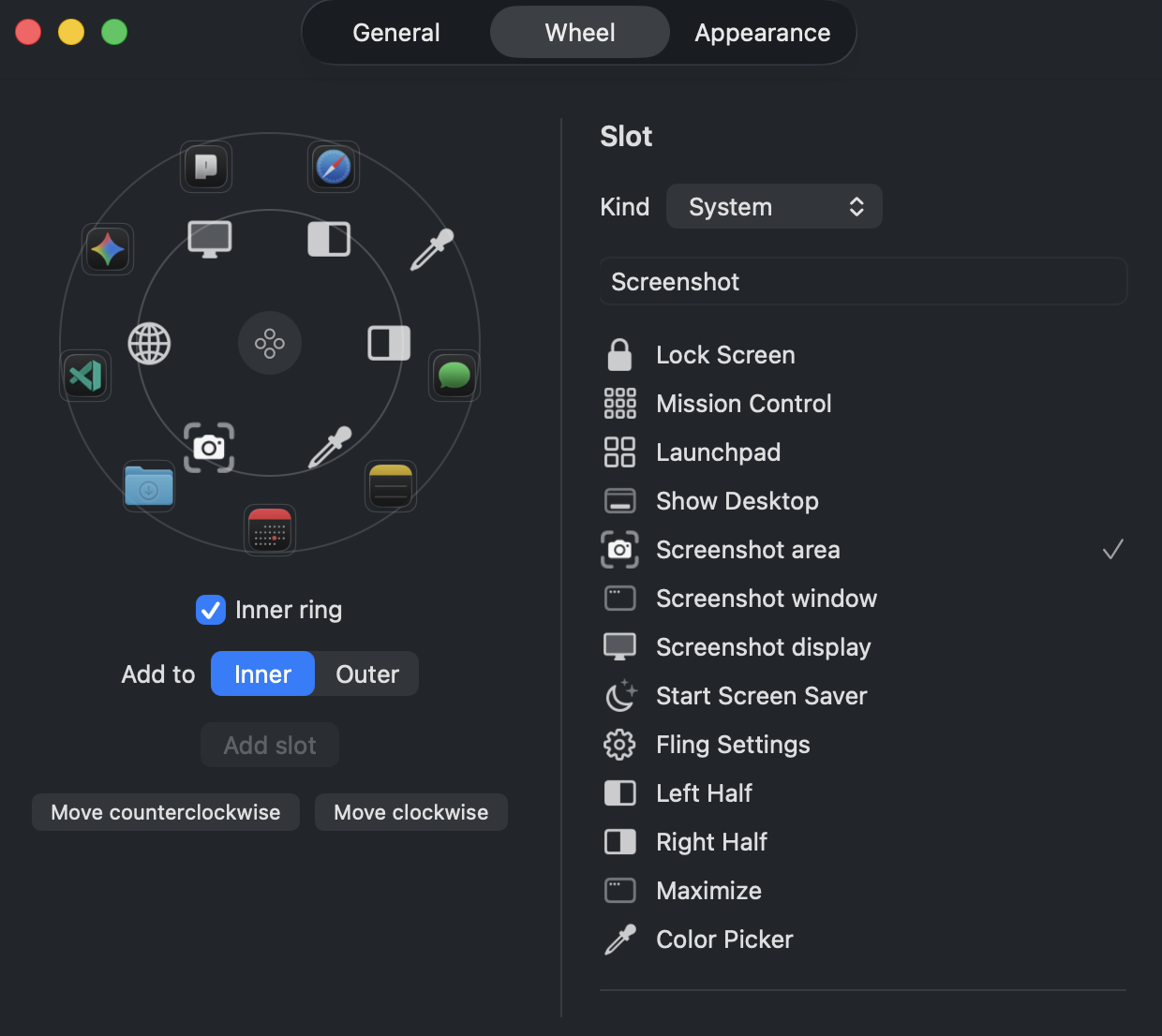
- Assign actions. Add an app, file, folder, URL, system command or recorded keyboard shortcut to a wheel slot.
- Hold, point and release. Hold the trigger so the wheel appears at the pointer, move toward the desired slot, then release to run the configured action.
This flow combines keyboard and pointer input: you hold a shortcut while moving the pointer. Whether it fits your setup depends on your keyboard, pointing device and action choices.
Start with a short list of repeatable actions
Fling supports up to 15 slots: six in the inner ring and nine in the outer ring. That is a maximum, not a recommendation to fill every slot. One possible setup is to place a few frequently used apps or folders in one ring, then put window controls, a screenshot action or the color picker in another. Keep search-heavy tasks in Spotlight, Raycast or Alfred.
- App and location actions: launch an app or open a configured file, folder or URL.
- Window actions: request left half, right half or fill/maximize. Fling does not provide custom zones or saved layouts, and some apps constrain window sizing.
- Color sampling: open Apple’s on-screen sampler, then choose a HEX, RGB or HSL copy button in Fling’s result panel. Sampling does not copy automatically. See the Mac HEX-color guide.
- System and keyboard actions: assign a supported system action or a recorded sequence of keystrokes.
Check permissions and release limits
Fling needs Input Monitoring to detect the held trigger. Accessibility is needed for window actions and keyboard injection; it is not required for every app, file or URL action. The color picker needs Screen Recording permission before it can open. Window actions can fail when a target app does not support the requested operation.
Fling targets Apple Silicon and macOS 14 or later. The developer reports hands-on testing on an M1 MacBook Air running macOS 26.
Fling has a one-time license for up to two Macs, a 14-day refund policy and no free trial. The current early-launch price is $4.99 compared with a $9.99 regular price. Context-aware wheels, chains, snippets, directional switching, native Shortcuts/Siri triggers and profiles are planned, not released features.
Review Fling’s current requirements and price
Check the permissions and release caveats before deciding whether a configured action wheel fits your workflow.
View Fling details and pricingFrequently asked questions
Does Fling remove the keyboard from the gesture?
No. Fling combines a held keyboard trigger with pointer movement: hold the configured shortcut, move toward a wheel slot, then release. The default trigger is Control-Option and can be changed.
Can Fling tile every Mac window?
No. Fling offers left-half, right-half and fill or maximize actions. Window actions require Accessibility permission and may fail when an app does not support the requested resize or menu command.
Which macOS permissions does Fling need?
Input Monitoring detects the trigger. Accessibility is needed for window actions and keyboard injection. Screen Recording permission is needed for the color picker.
Should I fill every Fling slot?
No. Fifteen is the maximum, not a recommended starting count. Begin with a few actions you use and add more only if the layout remains useful.